Booking Calendar
The Excel spreadsheet linked below will give you access to booking a number of resources including Chromebook carts, the Library Learning Commons space, the conference room, and more.
Audio Cine Films
SD22 licenses a large catalogue of movies and television shows through Audio Cine Films. This service can be accessed using the button below and will only work while in an SD22 building.
Circulating Textbooks
Signing Textbooks IN
-
Click the Green Left Arrow icon:
-
Scan or type the book’s barcode (found inside the back cover).
-
Verify that it is the correct copy by checking the top line of the IN list:


Signing Textbooks OUT
-
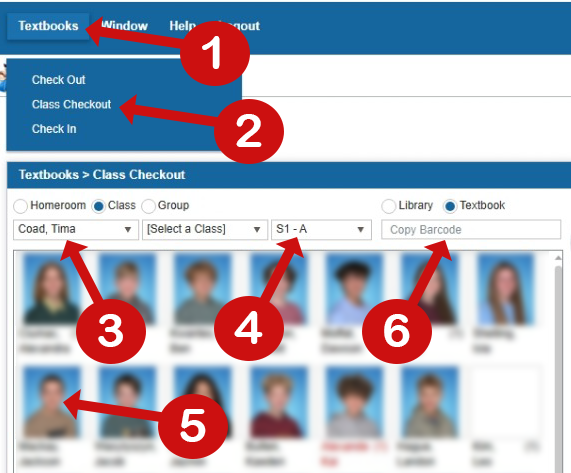
Click the "Textbooks" drop-down menu 1 and select "Class Checkout" 2.
-
Use the pull-down menu to select your name 3.
-
Select the class block you would like to check books out to 4.
-
Click on a student’s name or photo 5.
-
Scan or type the textbook’s barcode (found inside the back cover) into the "Copy Barcode" field 6: